Version 0.10.0 · Windows

Animate Roblox rigs in a real desktop app.

Cadence is a standalone animation suite for Roblox — a proper 3D viewport with inverse kinematics and onion skinning, full Moon Animator 2 feature parity, a multi-layer VFX studio with a procedural node engine behind it, and two-way sync with Roblox Studio. Free and open source.

Installer, 97.4 MB MIT licensed Updates itself in place No account needed

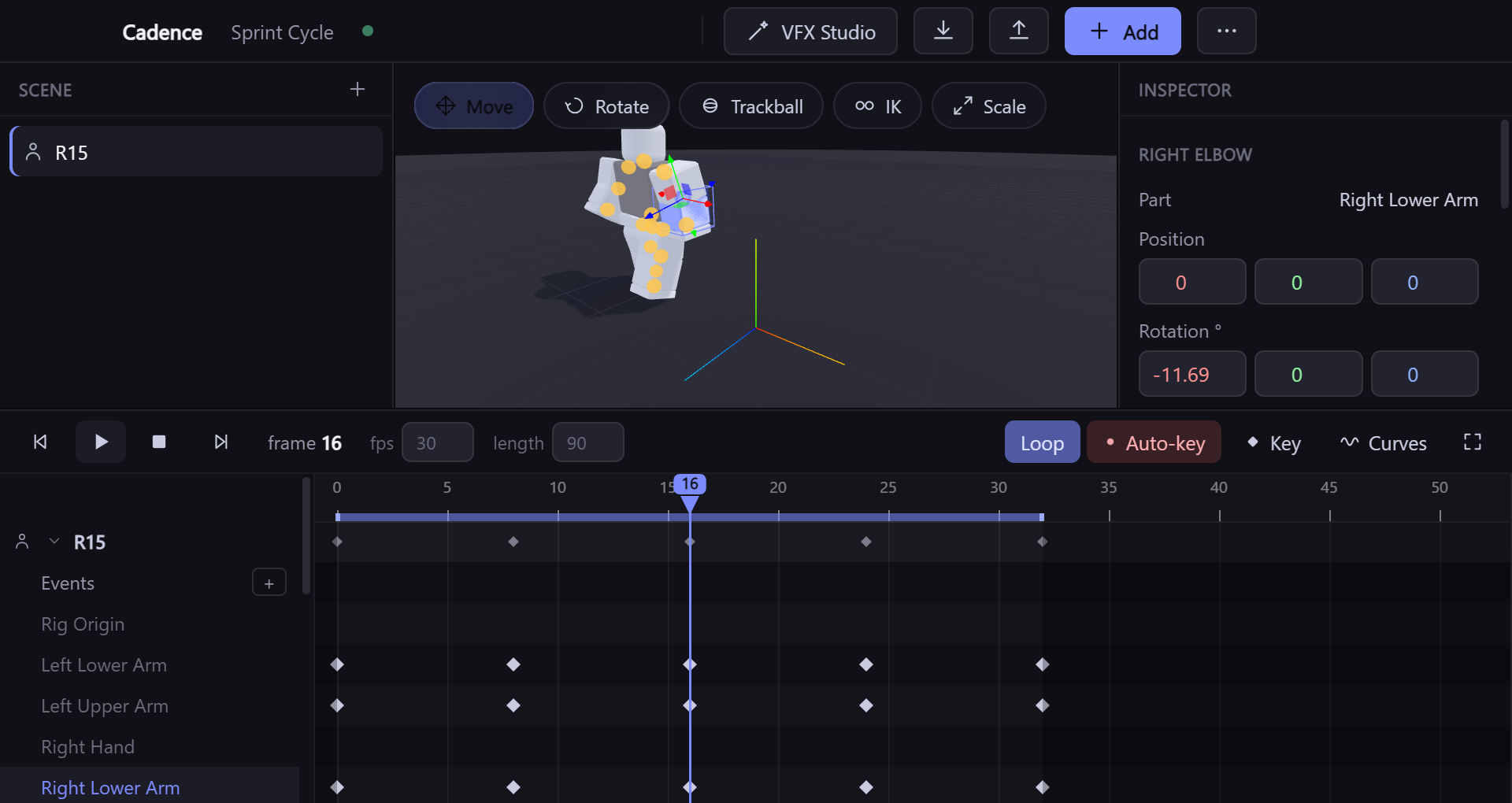
The Cadence Animator window: a scene list on the left, an R15 Roblox rig posed mid-stride in the 3D viewport with a transform gizmo on its right arm, an inspector on the right showing the Right Elbow joint at -11.69 degrees, and a dope-sheet timeline below with keyframes on twelve joint tracks.
An unedited screenshot of Cadence 0.10.0 — R15 rig, twelve keyframed joint tracks, playhead on frame 16.
52easing curves — 13 styles × 4 directions, ported bit-exact from Moon
63keyboard shortcuts, and a 117-command palette behind Ctrl K
135MCP tools, so Claude can drive the app directly
396particle presets, plus 25 multi-layer effect archetypes

The animator

Everything you need to pose, time and polish.

Cadence is not a docked plugin panel — it is a real application with a real viewport, resizable panels and its own window. Every feature below is in the shipping build.

A true 3D viewport

Move, rotate, scale and trackball gizmos over a three.js scene. Rigs render the way Studio renders them — part shapes, colours, meshes, UGC textures and SurfaceAppearance faces, measured against Studio rather than approximated.

4 gizmo modes

Inverse kinematics

Drag a hand or a foot and the joints above it follow. A cyclic-coordinate-descent solver works on the rig's own motors, with a configurable chain length, and lands its result in the same auto-key and undo pipeline as manual posing.

press T

Onion skinning

See where the pose came from and where it is going: ghosts of past frames in blue and future frames in orange, drawn from the same geometry as the live rig so they cost nothing extra to show.

Real curve editing

A dope sheet for timing and a bezier curve editor for feel. Thirteen easing styles in four directions each, ported from Moon Animator's own engine and verified bit-exact — including the two quirks Moon has, kept on purpose so animations match.

13 styles × 4 directions

Timeline that does the tedious work

Group keyframes so they move together, mirror a pose left-to-right, and fill, repeat, stretch, reverse or offset whole frame ranges. Box-select works correctly even while the timeline auto-scrolls under the drag.

World-space tracks

Flag any track as unparented and its keys store world CFrames instead of parent-relative motor transforms — so copying that motion onto a rig with different proportions reproduces the same path through space, not a wobble.

Animate to sound

Drop in an MP3, WAV or OGG and get a real waveform under the dope sheet, so a hit or a beat lands on the frame you can actually see.

Nothing to lose

There is no "save before you close". Every change is written to disk within a second, the last ten generations are kept as rolling backups, and reopening the app resumes the project you were in with no dialog to dismiss.

10 rolling backups

Built for long sessions

Four themes and six accent colours, every panel resizable with its size remembered, and a quality checker that sweeps an animation for rotation pops, dead joints, degenerate transforms and held-pose tails.

Roblox Studio

Bring rigs in. Send animations back.

A small companion plugin bridges Cadence and Studio over a local HTTP connection on 127.0.0.1:35747. Cadence installs it for you.

  1. Install the plugin Click the Studio offline chip in Cadence and it writes CadenceBridge.lua into your Roblox plugins folder. Restart Studio, turn on Allow HTTP Requests, and hit Connect on the new toolbar tab.
  2. Pull in any rig Your own Roblox avatar by username, whatever is selected in Studio's Explorer at any nesting depth, any model by asset ID, or an .rbxm / .rbxmx file. R6, R15, Rthro and Rthro Slender are built in.
  3. Animate, then export Cadence writes a KeyframeSequence into <rig>.AnimSaves.<name> — the same convention Roblox's own Animation Editor uses, so it opens there ready to publish.

Also crosses the bridge

  • Import an existing animation by published Roblox animation ID, or straight off a rig's AnimSaves — so Moon exports come in too.
  • Push from Studio with a Send Selection button, and re-read a rig's geometry with Sync Pose after editing it natively.
  • Rigs stay identified by a GUID, never by name — two rigs called Dummy can never overwrite each other's animations.
  • Cameras and object properties export as a self-contained Luau script — one baked row per frame, easing already applied.
One honest limit: no third-party tool can push an animation straight to Roblox's asset servers. Cadence gets it into the Animation Editor; the final Import → Export click is Roblox's, not ours.

Beyond joints

Animate the whole scene, not just the skeleton.

Cadence carries Moon Animator's animatable-property registry across in full: 67 Roblox classes' properties on a timeline, plus 22 one-shot actions you can fire on a frame. Events get markers with their own Luau, cameras get keyframed field of view, and four screen effects — vignette, letterbox, cover and subtitles — sit on the same timeline as everything else.

Animatable classes
67
One-shot action types
22
Value types supported
12
Screen effects
4
Easing styles × directions
13 × 4
Built-in rig presets
4

VFX Studio

A second window built only for effects.

Effects in Cadence are multi-layer documents, not one particle emitter with sliders. Every layer is keyframeable, every effect scrubs deterministically — frame 40 looks identical every time you land on it — and the whole thing exports as one self-contained Luau script.

EmitterParticles, with colour and density ramps over their lifelayer
Shape15 pure-maths primitives: arcs, ribbons, spirals, lightninglayer
LightTimed illumination that travels with the effectlayer
ScreenFull-frame overlays, built into their own ScreenGui on exportlayer
ShakeCamera shake that never accumulates drift, in-app or in Luaulayer
SoundAudio cued to the effect's own clip windowlayer

Stack them, clip them, drive any property with a curve or an expression, then layer on eight modifiers — noise, wind, pulse, flicker, orbit, fade, gradient shift, glow boost.

Sketch it

Draw the effect instead of describing it. Paint five layers on one canvas — shape, colour, density, motion and energy — and Cadence composes roughly thirty complete, fully editable effects from low-level primitives. Not thirty presets picked off a shelf: each composition's layer graph is assembled fresh from what you painted.

Or start from the library

Particle presets
396
Multi-layer archetypes
25
Colour themes × scales
6 × 3
Shape primitives
15
Modifier types
8

A visual node editor is in early access alongside the layer inspector, with eight node types covering create, appearance, motion, physics, timing and output. For effects the layer model cannot express, the procedural engine below is a separate mode.

Procedural engine

Build the effect nobody wrote a preset for.

A second way to author effects, next to the layer model rather than replacing it. Instead of choosing an effect and adjusting its properties, you compose one from primitives — maths, fields, noise, distance fields, geometry, particles, materials, renderers. The library accelerates that. It does not define what is possible.

FieldsA value that varies over space, time, a surface or a particle22 nodes
Distance fieldsShapes you can combine, round, hollow, repeat and twist28 nodes
Geometry & curvesPrimitives, sampling, instancing — spawn from any shape you can build42 nodes
ParticlesA real solver: forces, drag, collisions, per-particle attributes10 nodes
TexturesBuild an image from noise, then blur, warp, threshold, bake a flipbook19 nodes
RenderersSprites, meshes, trails, ribbons, beams, lights — swap one node9 nodes

354 node types across 27 categories. Every one documents its own units, ranges, common uses and exactly what Roblox does with it — and every one is in the editor's search palette and in Claude's catalogue, because they are the same list.
Small pieces, arbitrarily combined

There is no “colour over lifetime” setting anywhere in the engine. You wire a particle's normalised age into a gradient, and into colour. The same three nodes give you size over lifetime, opacity over distance, or emission over speed — including the combinations nobody anticipated.

Forces are vector fields, so gravity is a constant direction and turbulence is curl noise. Colliders are distance fields, so one collider node handles a plane, a sphere, a capsule and anything you built by combining them. Emitters take any geometry, so particles can be born from a shape the engine has never seen.

You wire all of it on a canvas, with typed sockets that show you what will connect and live previews on the nodes that have something to show. Claude works on the same graph through the same model, so an effect it builds opens as the real nodes and an edit you make by hand is one it reads back — there is no separate AI version of anything.

What it does with Roblox

Roblox decides what runs natively in Roblox. It does not decide what Cadence can author. So the exporter classifies every render pass and tells you which it is:

Native
A real ParticleEmitter
Converted
Beam, PointLight
Baked
Recorded per frame
Unsupported
Refused, with the reason

Colour gradients and size curves survive as real ColorSequences and NumberSequences where Roblox can take them. Motion it cannot reproduce — curl noise, collisions — is baked into a recording rather than quietly dropped or approximated into something else.

What it does not do yet

Stated here rather than discovered later. There is no fluid or pyro solver and no volumetric rendering, so genuinely simulated fire and raymarched clouds are out of reach — a stylised fire is not, and is what the engine is good at. Volume grids work as a cache for an expensive field, a 3D blur and a spawn region. Screen-space post-processing (bloom over the finished frame, motion blur, depth of field) needs a render target the preview does not have; the glow that exists works on a texture you built, and is named accordingly. Mesh editing — extrude, bevel, boolean — needs connectivity the geometry model does not carry. Procedural effects cannot yet be sent to the animator's timeline, which holds layer-based effects.

Where a capability is absent, the node for it is absent too — the type system refuses to register a node against a subsystem that does not exist, so there is no button that appears to work and does not.

MCP

Let Claude do the animating.

Cadence ships a Model Context Protocol server with 135 tools — 74 for the animator, 30 for VFX Studio, 31 for the procedural engine. Claude can add a rig, set exact keyframes, solve IK, run the quality checker and export to Studio. Crucially it can also look: render_frame screenshots the viewport at any frame and hands the image back, so it checks its own work instead of assuming.

It sees the result

render_frame returns a real image of the viewport at a given frame, and get_pose returns exact world CFrames without disturbing what is on screen.

It checks its own work

validate_animation flags rotation and position pops, joints that never move, non-orthonormal transforms and a dead tail after the last keyframe.

One click to connect

Press Claude Control in the title bar and Cadence registers itself with the Claude CLI. Installing from npm registers it automatically.

Every write tool answers with a fresh read-back of what changed, so a caller never has to assume a mutation landed. Setting up MCP →

Coming from Moon Animator 2

Everything it does, in a window of its own.

Moon Animator 2 is very good, and Cadence deliberately matches it — the same easing engine, the same keybinds, the same animatable-property registry, the same AnimSaves convention. What changes is where it runs and what it can reach.

Feature comparison between Moon Animator 2 and Cadence Animator
  Moon Animator 2 Cadence
Runs asA Studio plugin, docked in StudioIts own desktop application
Easing engine13 styles × 4 directionsThe same 13 × 4, ported bit-exact — quirks included
KeybindsIts own ~50-binding setThe same set, matched deliberately
Property & action tracksYesYes — 67 classes, 22 actions
Inverse kinematicsCCD solver on the rig's own motors
Onion skinningPast and future ghosts
World-space tracksAny track, convertible without drift
VFX authoringA separate multi-layer studio, exports Luau
Driven by an AI agent135 MCP tools, including screenshots back
Phone companionView and scrub over a temporary tunnel
Marker LuauRuns inside StudioAuthored and exported; runs in Studio after export
Live instance manipulationWrites to Studio instances as you scrubAuthors and exports; Studio applies

A dash means the feature is not present, not that it is bad. The last two rows are places where being a standalone app is a genuine trade-off rather than a win.

Download

Get Cadence 0.10.0.

Windows 10 or 11, 64-bit. No account, no licence key, no telemetry. Files are served from the project's GitHub release, which is the same place the in-app updater looks.

Portable

One executable, nothing installed. Good for a locked-down machine or a USB stick — but there is nothing on disk for the updater to replace, so new versions are a manual re-download.

Download portable
File
Cadence-Animator-0.10.0.exe
Size
97.2 MB
Auto-update
No
Verify this file (SHA-256) d0c347ecbdf97e6d0be817cf12a6dbefde337fa686e72e8d21063b8a85af8b91

From source

Clone it, or install straight from GitHub with npm — which also registers the MCP server with the Claude CLI for you.

npm install -g github:alycoulibal2-sketch/Cadence-Animator
cadence-animator
Licence
MIT
Stack
Electron + three.js
Repository
GitHub
Windows may warn you the first time. The build is not code-signed — a certificate costs money a free project does not have — so SmartScreen shows "Windows protected your PC" for new releases. Choose More info → Run anyway, or check the SHA-256 above against the file you downloaded first.

Questions

Before you download.

Do I still need Roblox Studio?
Yes, for two things: getting rigs out of your game and publishing the finished animation. You can animate entirely in Cadence — the built-in R6, R15, Rthro and Rthro Slender rigs need no Studio at all — but Studio is where the export lands and where Roblox's own Animation Editor turns it into an asset ID.
Is there a macOS or Linux build?
Not today. The published builds are Windows x64 only. The app is Electron, so nothing about it is fundamentally Windows-bound, but no other platform has been built or tested and it would be wrong to imply otherwise.
Will it overwrite my Moon Animator work?
No. Cadence reads and writes the same AnimSaves folders Moon and Roblox's Animation Editor use, and identifies rigs by a GUID attribute rather than by name, so it cannot mix up two rigs that share a name. Exports go to a name you choose.
How do updates work?
The installed build checks the project's GitHub releases a few seconds after launch, and whenever you run Check for updates. If there is a newer version a chip appears in the title bar. Nothing downloads or installs until you click it, and a failed background check stays silent rather than interrupting you.
What actually gets sent anywhere?
Roblox's own servers, for the things that need them: looking up an avatar, fetching a mesh, texture or model asset, and reading a published animation. The update check hits GitHub. The Studio bridge and the MCP server are both loopback-only. The phone companion is off unless you turn it on, and then it is token-gated. There is no analytics or telemetry of any kind.
Is it finished?
It is at 0.10.0 and used in real projects, with a 51-check smoke test run before each release. It is also below 1.0 and moving quickly. The node editor inside VFX Studio is explicitly early. If something breaks, the app keeps a log next to its settings and the repository takes issues.

Open it and animate something.

A rig is two clicks away, and there is no project to set up first.